
Creating short form video takes time.
First, brands need to plan ideas, record footage, write scripts, edit clips, and review performance. As a result, even a simple Reel can require several steps before it is ready to publish.
Instagram Edits is designed to make that process easier.
Meta launched Edits as a mobile video creation app with editing tools, project management, templates, and performance insights. Since then, the app has continued to add features that help creators plan, create, and improve their content.
In 2026, Meta highlighted new tools including a teleprompter, an Ideas tab, personalized inspiration, and comment insights. The company also said it plans to continue expanding insights and customization.
For brands, these updates are useful because content creation is becoming more connected to content performance.
Instead of simply creating a video and moving on, teams can use their audience and performance data to improve what they create next.
Why Instagram Edits Matters for Brands
Video is now a major part of social media marketing.
However, managing video production can become complicated when brands rely on several different tools.
One tool may be used for editing.
Another may be used for scripts.
A separate platform may be used to collect content ideas.
Then, marketers need to review performance somewhere else.
Instagram Edits brings more of these tasks into one workflow.
That can help brands create content more efficiently while keeping the creative process organized.
More importantly, Edits encourages a cycle of create, publish, analyze, and improve.
That approach can help brands make better content over time.
What Is Instagram Edits?
Instagram Edits is Meta’s mobile video creation and editing app.
It includes tools for editing clips, adding text and effects, organizing projects, creating templates, and preparing videos for social media.
Meta also designed Edits to support content that can be shared beyond Instagram. Videos can be exported without added watermarks, which makes the app useful for brands managing content across multiple platforms.
For example, a brand could create a video in Edits and later adapt the same idea for TikTok or YouTube Shorts.
This makes the app more useful as part of a broader content workflow.
The Latest Instagram Edits Features
Meta continues to develop Edits with tools designed around both creation and audience feedback.
Some of the newest features are particularly useful for brands.
Teleprompter
The built in teleprompter can help creators follow a script while recording.
This is useful for:
- Educational videos
- Product demonstrations
- Talking head content
- Tutorials
- Interviews
Instead of memorizing every line, presenters can follow a short script while recording.
However, scripts should still sound natural.
Keep the wording conversational and focus on one main idea at a time.
Ideas and Inspiration
Edits also includes an Ideas tab that helps creators organize inspiration.
Meta says Edits can bring saved Reels, audio, and notes together while also providing personalized inspiration based on what creators post.
For brands, this can help solve a common problem:
What should we post next?
A customer question can become a Reel.
A saved video can inspire a new format.
A recurring topic can become a content series.
Instead of starting with a blank page, teams can build a collection of ideas over time.
Comment Insights
For example, comments can provide valuable information about what audiences want.
Edits now includes insights that can summarize comments, helping creators understand common reactions and questions.
This creates a useful content opportunity.
If several people ask the same question, turn that question into your next video.
If viewers want more information about a topic, create a follow up.
As a result, audience feedback can become part of the content strategy.
Use Instagram Edits to Build a Better Content Workflow
The biggest opportunity is not using every feature.
It is creating a repeatable process.
A simple workflow can look like this:
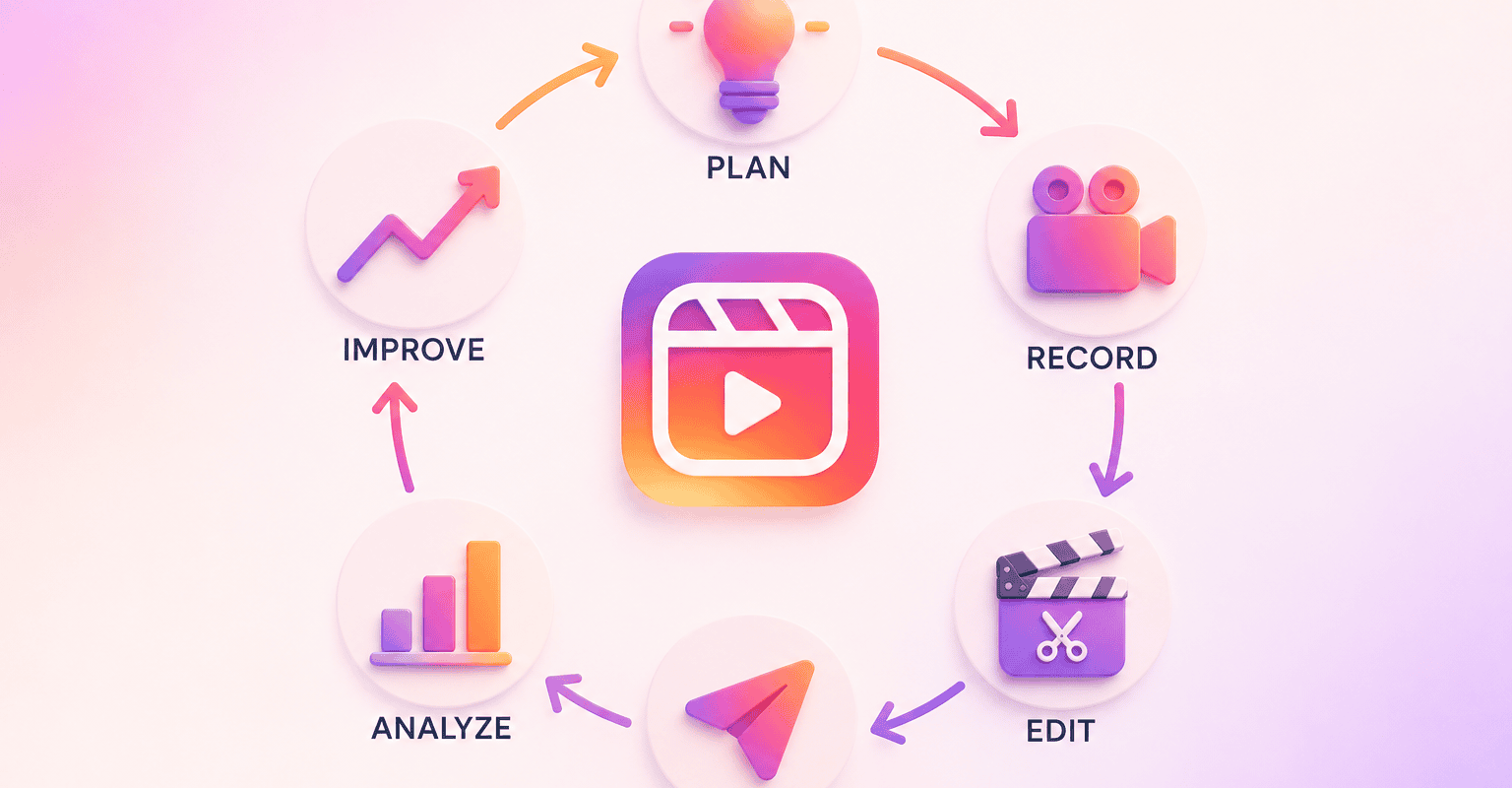
Plan → Record → Edit → Publish → Analyze → Improve
First, choose a topic that matters to your audience.
Next, record the content and edit it in Edits.
After publishing, review the results.
Finally, use what you learned to improve the next video.
This makes content creation more strategic.
Each post gives your team information that can influence future content.
Use Data to Improve Your Reels
Creating content is only half the process.
The other half is learning from the results.
In addition, performance data can help brands understand which topics, hooks, and formats are attracting attention.
For example, imagine a brand notices that educational Reels consistently receive more saves than promotional videos.
That is useful information.
The brand could create more educational content while using promotional posts to support conversions.
Similarly, if viewers leave during the first few seconds of a video, the opening may need improvement.
The goal is not to chase every metric.
Instead, look for patterns that can improve your overall strategy.
Use Instagram Edits for Content Repurposing
Another major opportunity is repurposing.
One piece of content can become several assets.
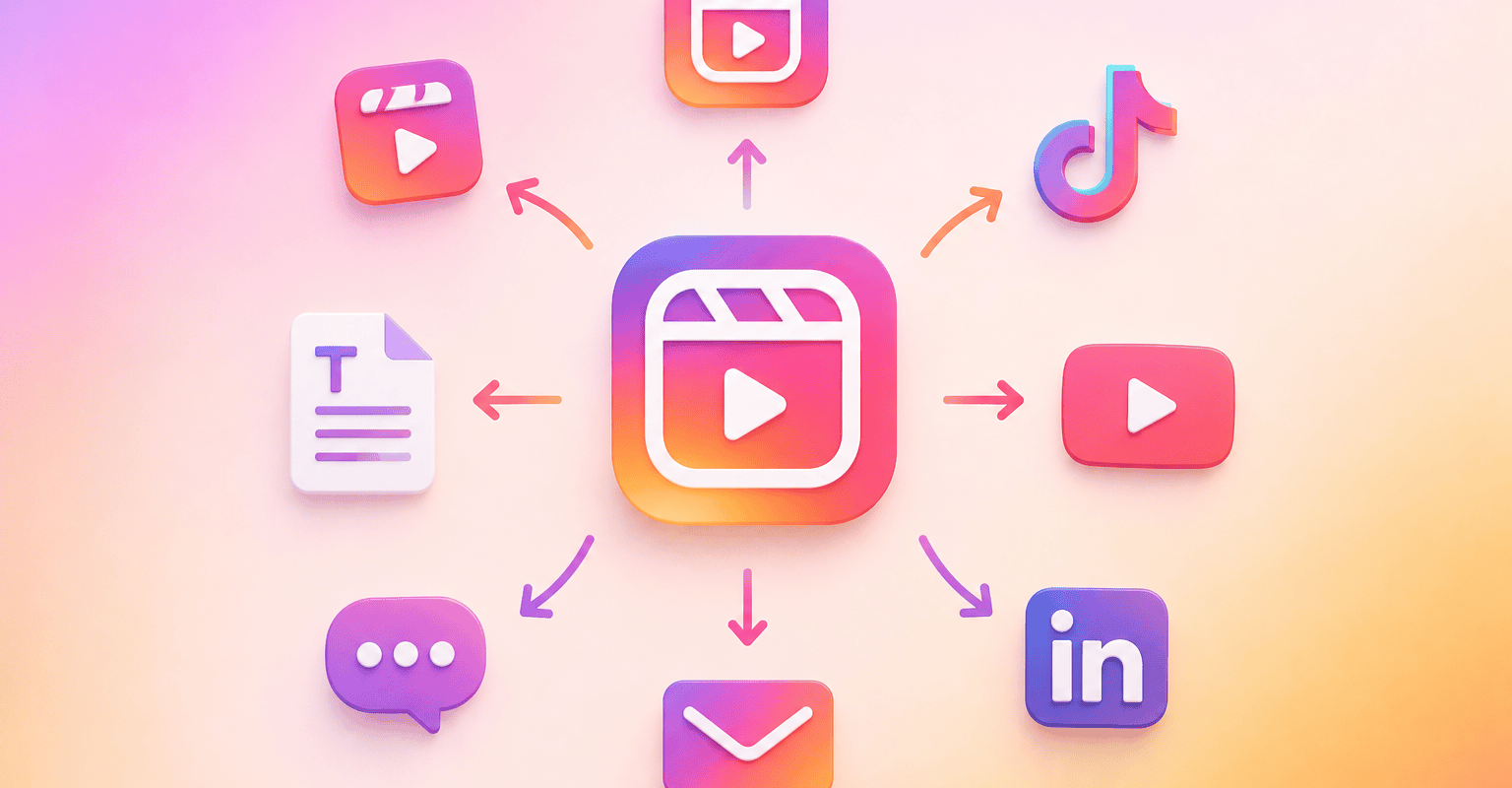
For example, a brand could record one longer educational video and turn it into:
- A main Reel
- Short clips
- A customer FAQ
- A TikTok
- A YouTube Short
- A LinkedIn video
This is where a content repurposing strategy can save time.
Instead of asking what to create from scratch every day, look at what your brand already has.
Strong ideas can often work in several formats.
That allows brands to create more content without constantly starting over.
Create a Consistent Brand Style
Editing tools can also help brands build a recognizable visual identity.
That identity can come from:
- Fonts
- Colors
- Text placement
- Video framing
- Editing pace
- Caption style
- Tone
Consistency makes content easier to recognize.
However, consistency does not mean every video should look identical.
Instead, create a flexible visual system that allows different ideas to still feel connected to the same brand.
Instagram Edits can make it easier for teams to maintain that consistency.
Common Instagram Edits Mistakes
Using Too Many Effects
More effects do not automatically create better content.
Use editing tools to support the message.
Making Videos Too Promotional
Social audiences still want useful information.
Teach, entertain, or solve a problem before asking people to buy.
Ignoring Audience Feedback
Comments and reactions can reveal what your audience wants to know next.
Use those signals to develop future content.
Measuring Only Views
Views show reach, but they do not tell the entire story.
Also consider saves, shares, comments, profile visits, clicks, and conversions.
Creating Everything From Scratch
Your existing content can be one of your best sources of new ideas.
Repurpose strong topics instead of constantly starting from zero.
How Brands Should Use Instagram Edits
Brands do not need to use every feature available.
Instead, choose tools that solve actual problems.
If your team struggles with scripts, use the teleprompter.
If you need more ideas, use the Ideas tab.
If audience feedback is difficult to analyze, use comment insights.
If your editing process is slow, use Edits to organize more of the production workflow.
Most importantly, connect the tools to your strategy.
Technology should support the process.
It should not replace the strategy behind it.
What Instagram Edits Means for Brands
The continued development of Instagram Edits shows that content creation is becoming more connected to insights and audience behavior.
Editing is becoming easier.
Ideas are easier to organize.
Audience feedback can provide content opportunities.
Performance data can influence what brands create next.
Meta has also said it plans to continue expanding Edits with more customization, insights, and creative tools.
For brands, the opportunity is to build a smarter content system.
Create efficiently.
Learn from your audience.
Improve your content.
Then repeat the process.
Key Takeaways
- Instagram Edits is becoming a broader video creation and content workflow tool.
- New features include a teleprompter, Ideas tab, personalized inspiration, and comment insights.
- Brands can use audience feedback to generate new content ideas.
- Performance data can help improve future Reels.
- Repurposing can help brands get more value from existing content.
- Consistent visuals can make brand content easier to recognize.
- Brands do not need to use every Edits feature.
- The best results come from combining useful tools with a clear content strategy.
Final Thoughts
Instagram Edits is becoming a useful tool for brands that want to create better short form content without making production unnecessarily complicated.
The real value is not any single feature.
It is the ability to connect ideas, creation, audience feedback, and performance.
Use the tools that make your workflow easier.
Listen to what your audience is asking.
Study what performs well.
Then use those insights to create better content.
Better tools can make content easier to create. Better strategy makes that content worth creating.
Ready to Build a Smarter Social Media Strategy?
At Ampfluence, we help brands create content that doesn’t just perform once, it continues driving engagement through smart repurposing and strategic planning.


25 Responses
Creating consistent video edits for social media channels always leads to massive media library clutter across external drives. Between raw 4K clips, color-graded exports, and thumbnail drafts, keeping my editing folder structured on macOS was a total nightmare. During my last content batch cleanup, I relied on https://www.filemanagermac.com/ to find dual-pane file managers, batch renaming utilities, and archive tools designed for Mac users. Moving to a split-screen layout allowed me to organize raw footage and final exports in seconds. Having a tidy asset library makes short-form video production and posting routine so much faster.
Stickman Hook is a game built around stickman hook movement, timing, and momentum, but what makes it truly enjoyable are those satisfying moments when everything goes perfectly.
The continued development of Instagram Edits shows that content creation is becoming more connected to insights and audience behavior. girl games online
The integration of provably fair verification technology on contemporary alternative networks like https://wintailscasino.com has fundamentally transformed user trust and statistical transparency. By allowing individuals to manually audit the cryptographic server and client seeds using standard open-source hashing algorithms, these platforms guarantee that outcomes are unalterable. For a data-driven strategist, learning to track and manipulate these seed pairs provides absolute verification of mathematical integrity. Operating exclusively within cryptographically validated environments ensures you are deploying your real-money resources onto a pristine playing field completely free from artificial distortions.
With its vast snowy mountain landscapes, high speeds, and a constant stream of obstacles, Snow Rider 3D offers the sensation of a winter race with no finish line—where the bolder the player, the greater the chance of achieving an impressive score.
The project management angle is a game-changer for brands juggling multiple Reels at once—being able to track every step from scripting to publish inside the same app saves a ton of back-and-forth. Curious if the performance insights go deep enough to show drop-off points per clip, or if it’s just overall view counts.
I recently came across AbuKing Casino and was genuinely impressed by how polished and well-crafted the whole platform feels. The design is clean and modern, with a layout that makes navigation smooth and intuitive right from the start. Whether you’re browsing on a desktop or using your phone, everything adapts seamlessly, and the overall experience feels thoughtful and user-friendly. The site has a distinctive Aladdin-themed aesthetic that adds a touch of character without being overwhelming, and the interface is clutter-free and easy on the eyes. If you’re looking for a fresh, well-designed digital space with a smooth and enjoyable atmosphere, AbuKing Casino is definitely worth a look.
The project management angle is a big differentiator—being able to track a Reel from raw footage to performance review inside the same app removes the usual back-and-forth between tools. Curious if the templates are flexible enough for branded content or if they lean too generic.
The project management angle is a game-changer for brands juggling multiple Reels—having planning, editing, and performance insights in one app eliminates the usual tool-hopping. Curious how its analytics stack up against native Instagram insights for tracking campaign ROI.
The project management angle is the real game-changer here—being able to plan a Reel’s entire workflow inside the same app where you edit it finally cuts out the back-and-forth between notes apps and editors. Curious if the performance insights go deep enough to replace a separate analytics tool for brands tracking multiple posts.
The project management angle is what sets this apart for brands — tracking scripts, footage, and edits in one place removes a lot of the back-and-forth that usually slows down Reel production. Curious to see if the performance insights will eventually feed back into template recommendations.
The project management angle is what stands out most here—being able to track scripts, raw clips, and edits in one place directly tackles that chaotic pre-publish workflow. Curious if the performance insights also feed back into content planning, or if that’s still a separate step.
The project management angle is a game-changer—being able to track every Reel from ideation to performance review inside one app cuts out the back-and-forth between tools. Curious if the templates are customizable enough for brand-specific aesthetics, or if they’re mostly generic starting points.
The project management and performance insights in Edits could make the Reel workflow much more efficient for brands, especially when planning, reviewing, and refining short-form content in one mobile app.
This is a great breakdown of Instagram Edits and its evolving features. The idea of integrating project management and performance insights directly into a mobile editing app could indeed streamline the content creation process for brands, especially those that rely on multiple tools. I appreciate the emphasis on using data to inform future content, as this aligns with the shift toward more strategic and iterative video production. It will be interesting to see how these features develop, particularly the more advanced insights, and whether they will be enough to replace the specialized platforms many marketers already use. The potential to shorten the feedback loop between publishing and improving is certainly a compelling reason for brands to explore this app further.
The combination of project management, templates, and performance insights makes Edits more useful for brands than a basic video editor. It could help teams move from planning a Reel to reviewing its results without juggling multiple tools.
The combination of project management, templates, and performance insights makes Edits especially useful for brands juggling multiple Reels at once. Streamlining planning and review could save teams significant time before publishing.
Edits’ combination of project management, templates, and performance insights could make the Reel workflow much more efficient for brands. Having planning and review tools in the same mobile app is especially useful when teams need to move from an idea to publish-ready footage quickly.
Edits’ combination of project management, templates, and performance insights could make the jump from planning a Reel to reviewing its results much more efficient for brands. The added workflow support is especially useful for teams producing short-form video consistently.
Edits looks especially useful for brands that need to manage the full Reel workflow in one place, from planning and templates to performance insights. The project management features could make it much easier to turn short-form video ideas into consistent campaigns.
The combination of project management, templates, and performance insights makes Edits especially useful for brands managing multiple Reels. Having planning and review tools alongside mobile editing could help shorten the gap between an idea and a publish-ready video.
The combination of project management, templates, and performance insights makes Edits especially useful for brands managing a repeatable Reels workflow. It could help teams move from planning and scripting to publishing without relying on several separate tools.
Discovering the world of online entertainment can be quite intimidating for beginners because of the intricate technical parameters and varied guidelines on different websites. A common error is signing up on unverified platforms, which frequently leads to unexpected transaction delays, unhelpful support agents, or modified slot programs that lower your chances. To guarantee a premium and secure experience right from the start, you should choose an established website that focuses on operational clarity and user safety, making https://baxterbet.org a perfect destination for your digital leisure. The onboarding routine is highly optimized and takes under three minutes, needing only essential contact information and a rapid validation step to activate your personal dashboard. Inside the lobby, finding your way through thousands of authentic gaming titles is effortless due to flexible sorting options based on software developers, themes, and current trends. New users can take advantage of the free play-for-fun mode across the slot catalog, which serves as a great tool to learn specific mechanics without risking any capital. Outbound payments are monitored by a dedicated financial team that successfully completes approvals within twenty-four hours through trusted systems.
Great overview of Instagram Edits and its potential for brands looking to create more engaging content. The new features seem like a useful way to streamline editing and improve creativity without needing multiple apps. Staying updated with tools like these can make a big difference in digital marketing success. I also enjoy exploring trending platforms and games such as A6WIN Game to see how different audiences engage with online content.
Hi,
Instagram editing features make it easier for brands to create engaging content and connect with their audience. For mobile photo and video editing, you can also check out https://inshotproapk.net/.